A strong investigation report should make the work easier to understand, not force the reader to decode inconsistent formatting. The case number should be easy to find. Observations should follow a clear chronology. Findings should be supported by the underlying activity. Photographs, video, records, and other attachments should be identifiable. The investigator and report date should not be buried at the end of a long document.
An OpenOffice Writer template gives private investigators a repeatable starting point for that work. Instead of rebuilding the cover page, section headings, tables, signature area, and disclaimer every time, the agency can open a fresh document from the same structured .ott file.
Download the private investigator report template
The free template uses US Letter pages, reusable Writer styles, ordinary bracketed placeholders, and no macros. It works in OpenOffice Writer and LibreOffice Writer.
Download the .ott fileWhat is an OpenOffice Writer template?
An OpenOffice Writer template is a reusable word-processing file with the .ott extension. It can store page dimensions, margins, fonts, paragraph styles, table formatting, headers, footers, and starter text. When you create a new document from the template, Writer gives you a working copy while preserving the original for the next report.
That is different from opening an old report and choosing Save As. Reusing a completed report can leave behind a former client's name, an old case number, hidden metadata, an outdated subject identifier, or narrative that should never appear in the new matter. A clean template starts with neutral placeholders and a defined structure.
Apache OpenOffice's official guidance explains that templates can preserve styles, page settings, predefined text, and other document choices. Its Writer template documentation also describes saving a prepared document as a reusable template.
What is included in this investigation report template?
The CaseWyze resource is designed as a practical starting point for private investigation agencies. It does not assume one case type or one jurisdiction. Instead, it provides a general report structure that can be shortened, expanded, or renamed to match the assignment.
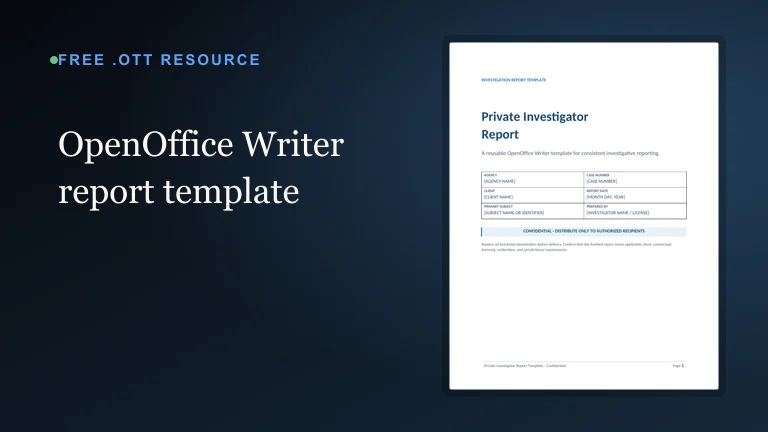
- A confidential cover page with agency, client, case, subject, date, and investigator placeholders
- An assignment overview for the objective, reporting period, instructions, and limitations
- A subject-information table for relevant identifiers and related parties
- Methodology and executive-summary sections
- A chronological activity table with date, time, location, and observation columns
- Finding sections that prompt the writer to connect conclusions to supporting information
- An evidence and attachment inventory
- A conclusion, recommended-follow-up section, and investigator declaration
- A signature area, page numbers, confidentiality footer, and operational disclaimer
The file uses ordinary bracketed placeholders such as [CASE NUMBER] and [CLIENT NAME]. These are visual prompts, not automated merge variables. Search for the opening bracket before final delivery to help locate any placeholder that still needs attention.
How to open and use the .ott file
Download the template and save it somewhere your agency can manage intentionally, such as a controlled operations folder. Double-clicking the file in OpenOffice Writer or LibreOffice Writer should create a new untitled document based on the template. The original .ott remains unchanged.
- Download the private investigator report template.
- Open the file in OpenOffice Writer or LibreOffice Writer.
- Save the new working document with a case-specific name before entering sensitive information.
- Replace every bracketed placeholder and remove sections that do not apply.
- Add chronology rows, evidence entries, and finding sections as the assignment requires.
- Run spelling, consistency, and factual reviews before exporting the final report to PDF.
If your office suite asks whether to create a new document from the template, choose the option that preserves the original template. Agencies can also import the file into their local template manager. Menu labels vary by OpenOffice or LibreOffice version, so consult the help documentation for the installed release when the interface differs.
Customize the template before agency-wide use
The downloadable version is intentionally neutral. Before using it as an agency standard, replace the generic title treatment with the approved agency name and branding. Confirm the correct business address, license language, confidentiality wording, and contact details. Review the footer and declaration with the person responsible for report quality.
Then decide which sections should be required. Surveillance reports may need a detailed chronology with weather, location, arrival, departure, and video references. Background investigations may rely more heavily on records, sources, and verification notes. Workplace or corporate matters may require interview sections and a stricter distinction between statements, observations, and analysis.
Do not make a template so rigid that investigators have to force every assignment into the same narrative. The goal is consistent packaging and quality control, not artificial uniformity.
Use Writer styles instead of manual formatting
The template includes styled headings, body text, table headers, callouts, and placeholders. Writer styles let an agency change the appearance of every equivalent element from one place. If the approved heading color changes, update the heading style instead of selecting and recoloring every heading manually.
Styles also improve report navigation and consistency. A real heading remains a heading when the report grows. Body text keeps the same spacing. Table labels remain readable. Page breaks are easier to manage than they are in a document assembled with repeated blank lines.
When adding a new section, copy the structure of an existing section or apply the appropriate heading style. When adding chronology rows, extend the existing table rather than pasting a differently formatted table from another report.
Write chronology entries that stand on their own
The chronology is often the operational core of an investigative report. Each entry should give the reader enough context to understand when and where the activity occurred, who performed or observed it, what happened, and what supporting material exists.
Use consistent time notation and identify the relevant time zone when readers could reasonably be in different regions. Distinguish direct observation from information supplied by a client, witness, database, public record, or other source. Avoid vague entries such as “continued investigation” when a more precise description can be provided without disclosing protected methods.
A well-maintained staff updates workflow makes report preparation easier because investigators are not rebuilding the chronology at the end of the assignment. The case record should preserve useful activity while the details are fresh.
Connect findings to supporting information
A finding should not appear as an unsupported conclusion. Identify the observation, record, interview, photograph, video segment, or other information that supports it. If the evidence is incomplete or conflicting, say so. If a statement is an analytical interpretation rather than a directly observed fact, make that distinction clear.
The evidence table in the template provides a place to list files or items, their dates or sources, and their relevance. Agencies with formal chain-of-custody requirements should add the identifiers, integrity information, collection details, transfers, or custody fields required by their policy. The broader digital evidence chain-of-custody guide explains why those controls matter.
Export a clean PDF for review and delivery
Before export, search the document for bracket characters, sample text, duplicated rows, comments, and tracked revisions. Confirm that headings are not stranded at the bottom of a page, tables do not split awkwardly, and the footer displays correctly. Review the spelling of every name and identifier against the case record.
Use Writer's PDF export rather than printing to an image-only file. A proper text-based PDF is easier to search and generally preserves sharper text. Confirm the exported page size, page count, attachment references, and signature workflow before delivery. If the report contains sensitive information, follow the agency's approved security and delivery process.
Keep the template separate from case-management automation
This download is a standalone educational resource. It does not connect to CaseWyze automatically, import case data, replace placeholders, or upload the finished report. Agencies can use the template whether or not they have a CaseWyze account.
CaseWyze helps organize the operational record that supports reporting: cases, subjects, activities, staff updates, attachments, time, expenses, emails, and timelines. The template gives investigators a structured document for turning reviewed information into a deliverable. Keeping those roles clear avoids promising automation the file does not contain.
Report-template quality-control checklist
- Confirm the client, case number, subject, report date, and investigator on the cover.
- Remove every unused placeholder and irrelevant section.
- Verify names, dates, times, addresses, vehicle identifiers, and reference numbers.
- Separate direct observation, third-party statements, records, and analysis.
- Make sure findings point to supporting activity or evidence.
- Check that referenced files and attachments use consistent identifiers.
- Review confidentiality, licensing, signature, and delivery requirements.
- Inspect the exported PDF page by page before sending it.
Important limitations
This template is not legal advice, an evidentiary certification, or a universal reporting standard. Report requirements vary by client, contract, assignment, agency policy, licensing authority, court, and jurisdiction. The responsible investigator and agency should decide what information is appropriate, lawful, necessary, and supportable.
Do not include personal or sensitive information merely because the template provides a place for it. Collect and report only what is relevant to the authorized assignment and permitted by applicable requirements.
FAQ
What is an OpenOffice Writer template?
An OpenOffice Writer template is a reusable .ott file that stores document structure, styles, page settings, and starter content. Opening it creates a new working document while leaving the original template available for reuse.
Can I use this template in LibreOffice Writer?
Yes. The download uses the standard OpenDocument Text Template format and is compatible with current OpenOffice Writer and LibreOffice Writer releases.
Does the template connect to CaseWyze automatically?
No. This is a standalone reporting resource. It does not import CaseWyze data, replace fields automatically, or require a CaseWyze account.
Does the template contain macros?
No. The file contains document styles, tables, page settings, and ordinary bracketed placeholders. It does not contain macros, scripts, or external resources.
Is this template legal advice or a required report format?
No. It is a general operational starting point. Agencies should adapt it to their client agreements, internal policies, licensing rules, evidentiary needs, and jurisdiction-specific requirements.