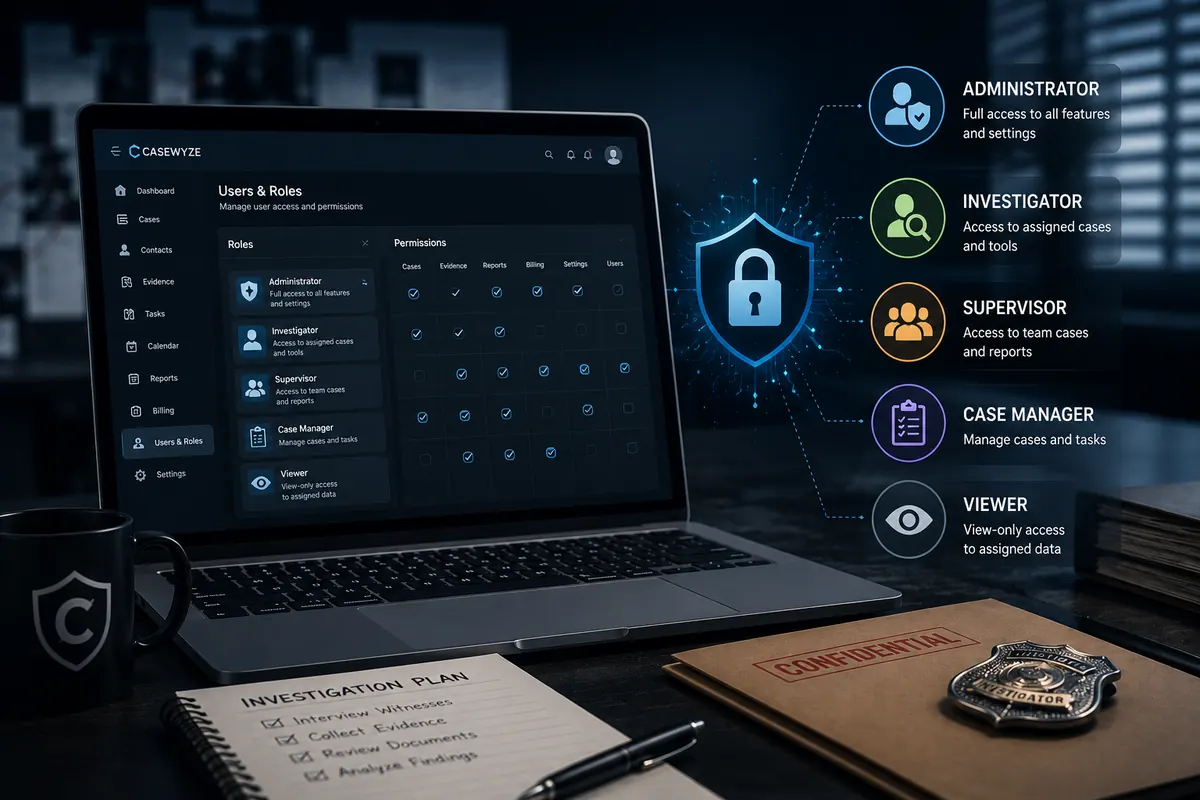
Investigative case data is sensitive by default. A routine case may contain personal identifiers, surveillance media, legal records, client communications, medical or insurance documents, financial information, internal strategy, and evidence. If every user can access every record, the agency is carrying unnecessary risk.
Role-based permissions help agencies control who can view, create, edit, export, or administer information. In investigation case management platforms, permissions are not just a technical feature. They are part of professional data handling.
Access should match responsibility
The principle is simple: users should have the access they need to do their work and no more. An investigator assigned to a case may need subject details, field updates, evidence upload, tasks, and calendar events. That investigator may not need billing administration, agency-wide financial reports, or unrelated client records.
NIST's role-based access control glossary gives a concise definition of this security model.
An admin may need intake, scheduling, invoice preparation, and contact management. A vendor may need a limited assignment and upload path. A client contact may need final reports or selected updates, but not internal notes. Role-based access makes those distinctions possible.
Permissions reduce internal exposure
Security conversations often focus on external threats, but internal exposure is just as important. Internal exposure does not always mean malicious behavior. It can mean a well-intentioned employee opening the wrong case, a vendor seeing more than necessary, or a former staff member retaining access after leaving.
Role-based permissions reduce the blast radius of mistakes. They also make access easier to review. Managers can ask whether a role is configured correctly instead of auditing every user from scratch.
Investigation teams have different user types
Investigative agencies often involve more than employees. They may work with subcontracted investigators, process servers, vendors, law firm contacts, insurance adjusters, corporate security stakeholders, and administrative staff. Each group has a different relationship to the case.
Modern case management platforms should support those differences. A vendor should not inherit the same permissions as an internal investigator. A client should not see internal review notes. A finance user should not necessarily have access to sensitive surveillance media.
Protect case data with clearer access.
CaseWyze is designed around organization-based access separation and role-aware workflows so teams can collaborate without overexposing sensitive records.
Start your 14-day free trialPermissions support chain-of-custody discipline
Evidence handling becomes stronger when access is controlled. If a platform can show who uploaded files, who had access, and who exported materials, the agency has a better operational record. Permissions do not replace chain-of-custody procedures, but they support them by reducing uncontrolled access.
This is especially important for digital evidence, which can be copied, downloaded, or shared quickly. Access controls help agencies limit evidence handling to authorized users.
Permissions improve client confidence
Clients increasingly expect professional data handling. Law firms, insurers, corporations, and government-adjacent organizations often ask how sensitive information is protected. A clear permission model gives agencies a better answer.
Instead of saying, “Only our team can access it,” agencies can explain that access is role-based, case-specific, and revocable. That signals maturity and can become a competitive advantage.
Common permission roles
Every agency will configure roles differently, but common role categories include owner, administrator, manager, investigator, finance, vendor, client contact, and read-only reviewer. The platform should allow enough flexibility to match real operations without becoming so complex that permissions are impossible to manage.
Role design should begin with workflows. Who creates cases? Who assigns work? Who uploads evidence? Who approves reports? Who manages invoices? Who exports files? The answers should drive permission settings.
Offboarding matters
Former employee access is a common security gap. When a staff member leaves, access should be revoked quickly. If the agency uses shared accounts, revocation becomes harder because changing one password may disrupt multiple people. Separate user accounts and role-based permissions make offboarding cleaner.
Agencies should review active users regularly, disable inactive accounts, and avoid shared credentials. These practices are simple, but they make a significant difference.
Do not make every user an admin
Small teams often give everyone admin rights because it feels convenient. Over time, that convenience creates risk. Admin users may be able to change permissions, view sensitive records, delete data, export files, or alter finance settings. Those capabilities should be limited.
Administrative access should be reserved for users who genuinely need it. Everyone else should have a role aligned with their actual responsibilities.
Permissions should follow the case lifecycle
Access needs change as a case moves from intake to active investigation, review, billing, and closeout. During intake, administrative staff may need broad setup access. During active work, investigators and managers may need operational access. During reporting, reviewers may need files and updates. After closeout, access may need to be restricted to managers, owners, or compliance personnel.
A mature permission model recognizes that access is not static. Agencies should be able to add users for a limited purpose and remove them when the purpose ends. This is especially useful for vendors, temporary staff, outside experts, and client-side reviewers who only need information during a specific stage of the matter.
Design permissions around real scenarios
The easiest way to build sensible permissions is to use real scenarios. Ask what a field investigator needs before a surveillance assignment. Ask what an admin needs to create an invoice. Ask what a vendor needs to complete a delegated task. Ask what a client contact should see if they request a status update. Each scenario reveals a different access boundary.
This approach prevents permission settings from becoming abstract. It also reduces the temptation to grant broad access “just in case.” If a role cannot be tied to a real work requirement, it probably needs to be narrower.
Audit trails and permissions work together
Permissions determine what users are allowed to do. Audit trails help the agency understand what happened. Together, they support accountability. If a sensitive file is exported, a report is modified, or a case record is updated, managers should be able to understand the relevant activity. This does not mean every action needs to become a management event, but important activity should leave a record.
Auditability is especially useful when agencies work with regulated clients, legal matters, insurance investigations, or sensitive corporate investigations. It gives the agency a stronger operational story if a client asks how access is managed or if an internal review becomes necessary.
Permissions reduce operational confusion
Good permissions are not only about security. They also simplify the user experience. When users see only the cases, tools, and actions relevant to their role, the platform becomes easier to navigate. A vendor does not need to sort through administrative options. A finance user does not need field task noise. A client reviewer does not need internal operational notes.
This improves adoption because the system feels more focused. Users are less likely to make mistakes when the interface aligns with their responsibilities. In that sense, permissions are also a usability feature.
Review access after organizational change
Agencies should revisit permissions whenever roles change, clients change, teams reorganize, or vendors are replaced. A staff member promoted into management may need new access. A contractor removed from a project should lose access. A client that changes reporting contacts may require updates to external visibility.
These reviews should be simple and recurring. The goal is not to create a heavy compliance ritual. The goal is to make sure access reflects reality. In sensitive investigative environments, outdated permissions are one of the easiest risks to avoid.
Permission mistakes that create avoidable risk
Several permission mistakes appear again and again in investigative operations. The first is shared credentials. Shared logins make it difficult to know who accessed a file, who changed a record, or who exported material. They also make offboarding harder because removing one person may require changing credentials for everyone.
The second mistake is broad default access. If every new user can see every case, the agency is relying on trust instead of controls. Trust matters, but it should be supported by technical boundaries. New users should receive the narrowest reasonable access for their role, then receive additional access only when a legitimate workflow requires it.
The third mistake is ignoring external collaborators. Vendors, clients, and outside reviewers often need limited information, but they should not inherit internal staff access. External roles should be designed carefully, with clear limits on viewing, uploading, editing, exporting, and commenting.
The fourth mistake is failing to document permission decisions. Agencies do not need a complicated bureaucracy, but they should know why a role exists and what it allows. A short role matrix can prevent confusion and make future reviews easier.
What to look for in a secure case management platform
A secure investigation case management platform should support separate user accounts, role-based permissions, organization-based separation, case-specific access, user revocation, and audit-friendly activity records. It should also make permissions understandable to administrators. If access rules are too confusing to manage, they are less likely to be maintained correctly.
The platform should also support operational flexibility. Agencies need to manage full-time employees, part-time investigators, vendors, finance users, administrators, managers, and sometimes client contacts. A permission model that cannot reflect those real relationships will either block legitimate work or encourage unsafe workarounds.
Permissions are part of client trust
Clients may never see the permission screen, but they feel the result. A law firm wants confidence that privileged material is not broadly visible. An insurer wants sensitive claim materials handled with discipline. A corporate investigations department wants internal matters protected from unnecessary exposure. Strong permissions allow the agency to explain how access is limited and how users can be removed when work is complete.
This can be a differentiator in sales conversations. Many agencies compete on experience and responsiveness, but operational security is increasingly part of the buying decision. Being able to describe role-based access, separate user accounts, and controlled collaboration helps position the agency as a serious professional partner.
Trust is easier to maintain when access rules are intentional, visible to administrators, and reviewed before sensitive work expands to additional people.
Conclusion
Role-based permissions are essential for investigation case management because the work involves sensitive information, multiple user types, and changing access needs. Good permissions protect clients, support evidence discipline, simplify offboarding, and improve operational accountability.
For agencies that want to grow responsibly, access control should be treated as a core workflow, not a checkbox.
FAQ
What is the difference between role-based and case-based access?
Role-based access controls what a type of user can generally do. Case-based access controls which specific cases that user can access. Mature systems often use both.
Should clients have portal access to cases?
Client access can be useful, but it should be carefully limited to approved updates, reports, or files. Internal notes and work product should remain protected.
How often should permissions be reviewed?
Agencies should review permissions whenever staff roles change and on a recurring schedule, such as monthly or quarterly depending on risk.